Calls, sheets and generation history
Everything you queue on Step 5 · Finish Sprites is sent to the AI as a call, and one call is one sheet: your sprites laid out side by side, each in its own cell, on a flat magenta field, sent once and cut back apart when the answer arrives. A call is the unit of money — the price on every Generate button is the number of calls times what one call costs, so how your sprites are packed is how much the step costs. This page is the reference for the packing, the 👁 panel that overrides it, the two ways to spend on only part of the queue, and the record every finished run leaves behind.
Costs. Only sending a call costs credits. Arranging the queue is free and unlimited: opening 👁 Calls, ticking and unticking calls, dragging a sprite from one call to another, Split into {N} calls, Repack, Auto-reduce sheets, entering and leaving Pick, and every panel in GENERATION HISTORY — including Re-cut G{n}, which cuts new sprites out of an image the run already stores. What is paid: ⚡ Generate, ⚡ Generate all and Run again, each of them priced per call and confirmed before anything is spent. A call that fails before it ever reaches the AI is refunded in full; one that fails after the AI has already run keeps a floor of one credit and returns the rest — see Credits & plans.
What a call is
The queue is packed rather than sent one sprite at a time, because one request that redraws eight sprites costs one price instead of eight. Pixploder builds each call as a grid:
- One cell per sprite, all cells the same size: the biggest member of that call plus 45 % more room, so the AI has somewhere to draw the parts that were hidden. Each sprite is drawn from its clean cut-out, never from a previous result. A member much smaller than the cell is drawn at a whole-number enlargement (up to four times) so that it still gets a fair share of the picture; the cut divides that enlargement back out, so the sprite comes back in its own box at its own size.
- The field is pure magenta. That flat color is what makes the answer cuttable: whatever is still magenta when the sheet comes back is "nothing here", and each sprite is keyed out of its own cell. It is also why a run that comes back on some other flat color is a problem — see
Re-cutbelow. - The grid is shaped toward the AI's output frame, not toward a square, because a sheet whose shape is far from what the model returns comes back squashed and no longer lines up with the cells it was cut from.
Three rules decide whether one more sprite may join a call. They are asked every single time the queue changes — when you queue a sprite, drag a name between calls, press Repack, or change the model:
- Count. Each model allows a fixed maximum number of sprites in one call. The card in
👁 Callsprints it as the denominator of{n}/{max} sprites, and the👁button's tooltip prints it for the whole queue (up to {max} sprites per call, or a range when the queue holds calls on different models). - Size. The packed sheet may not exceed 1536 px on either edge, and one model is additionally capped at its own smaller output bucket. A sheet past those limits gets scaled down by the AI and loses detail, so it is split instead.
- Detail floor. The AI spends a fixed budget on the whole returned image, so each sprite's share of the detail is its share of the canvas. Any member big enough to carry legible text — a signboard, a shopfront, a banner — is guaranteed a minimum share, and a call that would starve one is split. Small props (trees, barrels, crates) cannot hold readable text anyway and are exempt, which is why prop-only calls pack densely and lettered structures pack in ones and twos.
A call that will not take a sprite is not the only reason a new one is minted. A call you have unticked never receives new work either: when a sprite arrives and the only call with room is one you have taken out of the run, a fresh, ticked call is made for it instead, so a queued sprite can never end up somewhere no Generate will ever run.
One shape is handled at send time rather than by those three. A packed sheet more than three times wider than it is tall is outside every model's frame. On the model that shape was measured usable on, such a sheet is padded with magenta to exactly 3:1, an exact output size is requested for it, and the padding is cropped straight back off when the answer lands — so the cut still lines up. Pick a different model for a call that packs that wide and an amber line in the section's ⚙ says the pick is the one measured worse on that shape; it is a label, and it blocks nothing.
One more line about packing can appear under the money row, when a call holds more sprites than its prompt can name: A call packs {n} named sprites — only the first 12 are named in its prompt (the picture still identifies the rest; split in 👁 to name them all). Identity comes from the picture, so nothing is lost — but it is one more reason to split a crowded call. The other line that shows up there, {n} of {m} queued sprites carry a painted zone, is about fill zones and is covered on Step 5 · Finish Sprites.
Tip. Fewer sprites per call means a bigger share of the AI's output budget for each one, so they come back sharper. If a result looks soft or garbled, split the call — or give the sprite a call of its own — before paying for the same crowded sheet twice.
What a call costs
The price is flat per call and set by the model that call runs on. Every option in the Model picker inside the section's ⚙ prints its own per-call credit price, and that is the number the buttons charge. Two consequences worth knowing:
- The sprite count does not change the price. Eighteen props in one call cost one call; the same eighteen split across three cost three. That is the whole reason the packing is worth looking at.
- Both Generate buttons quote the same run. The
⚡ Generate · {N} calls · {X} crunder the queue and the⚡ Generate all · {N} calls · {X} crat the foot of the rail are two doors onto one flow: same list, same count, same price, one credit confirmation. They can never disagree because there is only one derivation behind them.
A call that is left out of the next run — unticked in 👁 Calls, or holding sprites another run is already generating — is not counted and not charged. Both buttons' tooltips count the unticked ones as {n} unticked stay queued, and while something is in flight they say how many calls a press would start instead.
The 👁 Calls panel
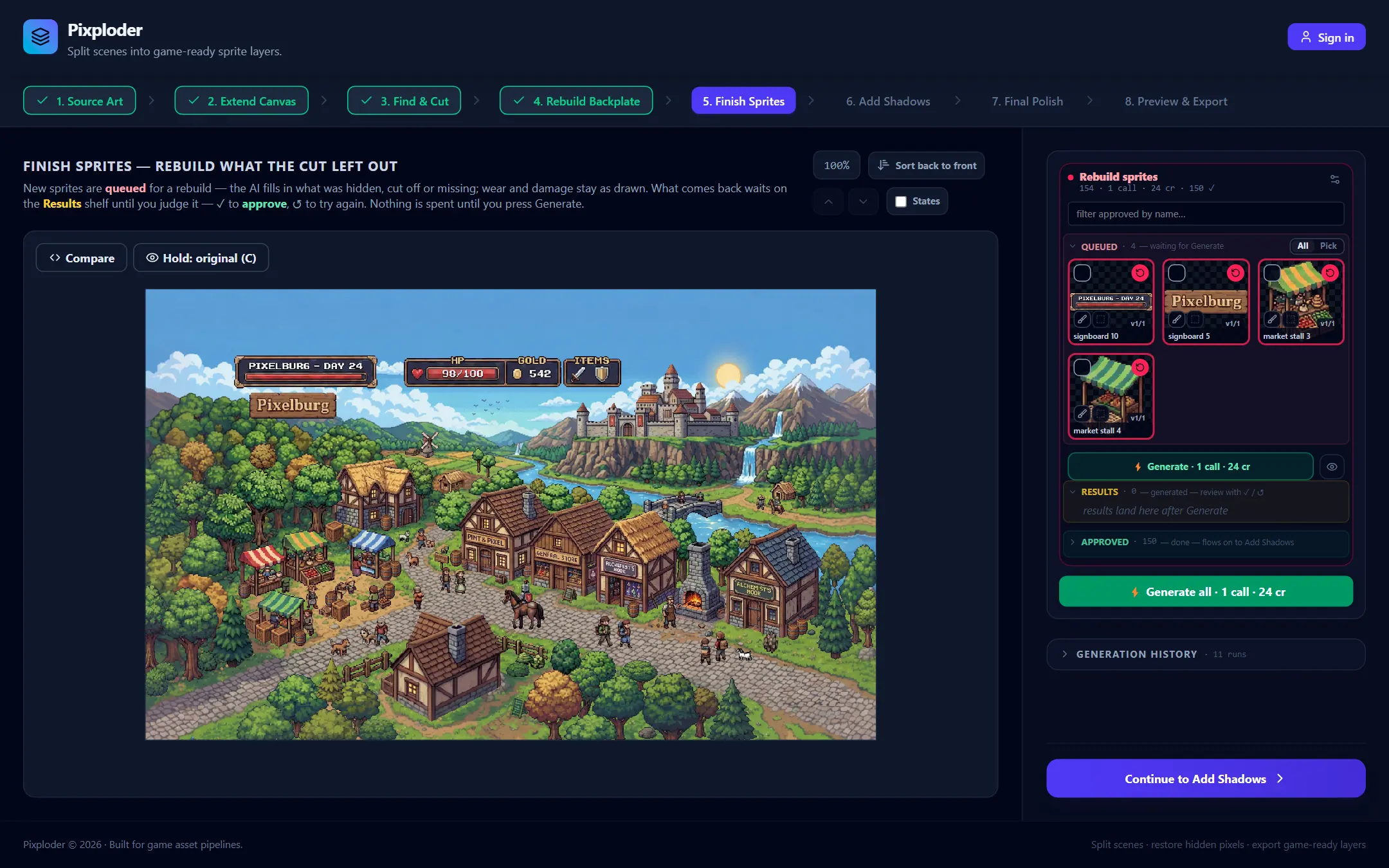
The 👁 button sits directly beside the money row it prices. It opens the Calls panel: one card per pending call, and it is the only place the packing is visible and the only place it can be overridden. A finished run is history and never appears here — it lives in GENERATION HISTORY at the foot of the rail.
Each card carries four things:
- A tick and a line reading
call {i}/{n} · {m}/{max} sprites · {X} cr. Untick it to leave that call out of the next run: the card dims and the line gains— skipped this run, its sprites stay queued for a later run, both Generate buttons drop its price, and the👁button itself turns amber so a folded panel can never hide a silent discount. The tooltip prices both directions before you click. A one-piece call — which only a project made before this redesign can carry — prints{m} sprites · one pieceinstead of the ratio, because the per-sprite limit is not its rule. - The sprites in it, by name, as chips. Drag a chip onto another card to move that sprite into that call; the packed picture and every price follow immediately. A card that cannot take it refuses while the name is still in the air, on the chip itself, and says why:
that call is full — {max} sprites max,no room in that call, orthat call is one piece. The chips of a one-piece call are not draggable at all, and say so. + drop here to start an empty callunder the cards. Drop a chip there to give that sprite a call of its own — deliberately one more paid call. The call it makes is marked as yours, so it survives being emptied again instead of being folded back into its neighbors.- The packed picture of that call — its sprites laid out in exactly the cells the call will use, rebuilt the moment the membership changes.
Two extra states appear on a card when they apply:
· ▨ maskedin violet: this call carries a real alpha mask, so it travels on a model that can carry one — the section's own model when it can, otherwise the model a mask falls back to — and cannot share a request with unmasked sprites. The line under the money row counts how many sprites that is. A one-piece call cannot mask part of itself and says so instead.· over the limitin amber, on a call packed before the current per-model sprite limit existed. It is never re-packed behind your back; instead the card explains that the members share the output budget and offersSplit into {N} calls · {X} cr, which re-bins the same sprites evenly into calls the model can draw well. The split itself is free — the credits on the button are what running the result would cost.
A card also prints · full in amber when it is exactly at the limit, which is legal and refuses nothing. With nothing queued at all the 👁 button is dead and says Nothing queued to pack.
Auto-reduce sheets and Repack
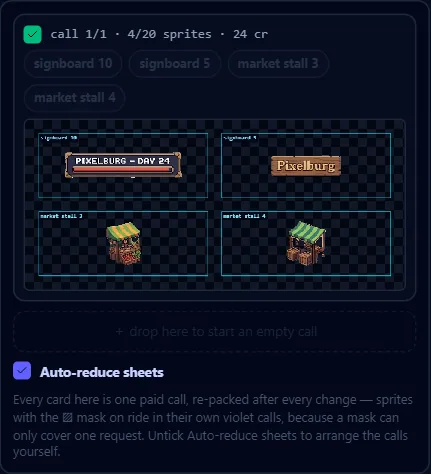
At the bottom of the panel sits one checkbox that decides who arranges the calls.
- Ticked —
Auto-reduce sheetshands the job to the app. After every change that could make the queue cost more than it has to — a sprite queued or approved, a call unticked, a mask toggled, a fill zone painted or cleared — the queue is packed back into the fewest calls it fits in, so the cards you see are exactly the calls you pay for. It waits while a run is at the model and catches up the moment that run lands, because re-binning a call somebody is already generating would file the reply onto a set it never sent. Arranging by hand is off while it is on: the chips and the+strip are dimmed and inert, and their tooltips name the checkbox that hands the gesture back. TheRepackbutton is hidden rather than grayed, because the mode has already produced what it would promise. - Unticked is manual arrangement: drag a name onto another call, untick what you do not want to run, and press
Repack into {N} calls · {X} crwhen it is worth it. The button only ever offers fewer calls — an equal-count reshuffle is not offered, because it can only move detail around at the same price. When there is nothing to gain it readsAlready the fewest callsand does nothing. It is grayed while a run is at the model or a chip is in the air, and the tooltip says which.
Repack replaces the hand arrangement it was pressed to replace — its tooltip says exactly that before the click (Hand-arranged calls are replaced; per-call settings are kept). There is no undo for the queue, so what it replaces is gone. The checkbox is saved with your project like any other field: a new project starts with it on, your own answer always wins, and a project saved before the checkbox existed opens with it off if it already holds a queue, because loading is not consent to re-pack it.
Careful. Ticking Auto-reduce sheets hands the arrangement over immediately, not on your next edit: the queue is re-packed as soon as the box goes on, and a hand arrangement replaced that way cannot be brought back. Unticking it changes nothing — the arrangement it produced simply stops being maintained.
All | Pick — spend on part of the queue
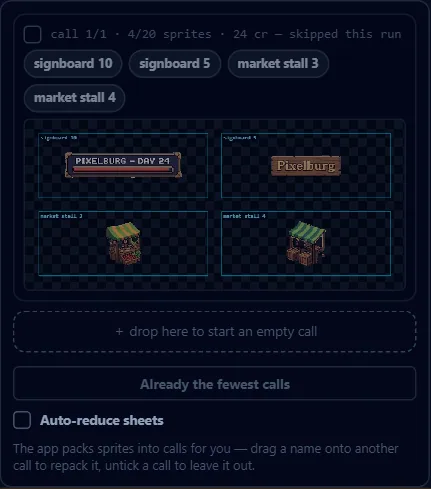
The QUEUED shelf header carries a two-state runner right after its count: All (the default — the next Generate spends every queued sprite) and Pick. Pick is opt-in, lasts exactly one run, and changes only who that run pays for. Both halves go dead while a run is in flight, and Pick is dead with nothing queued.
- What lights, what spends. With
Pickon, every queued tile dims and its rose↺corner goes out. Tap a tile, or its corner, to light it again. Rose keeps the one meaning it always had: a lit corner is what the next⚡spends.RESULTSandAPPROVEDtiles never dim. - The count lives in the shelf header:
— {n}/{m} picked · rest stay queued, or· every onewhen you have lit all of them. It survives a collapsed shelf.Pick allandClearsit beside it for a long queue. - One price everywhere. The money row reads
⚡ Generate {n} picked · {N} calls · {X} cr, the rail-foot button carries the same numbers, and a second line under the button says what stays behind:{n} unpicked stay queued — they keep their turn.With everything lit it readsEvery queued sprite is picked, followed by— same spend as Allonly when the two really do cost the same; otherwise it prints the numbers instead of the claim, because a picked run is often packed differently. With nothing lit the button reads⚡ Generate · nothing pickedand the line becomesNothing picked — tap a dimmed sprite to light it.; with every card unticked,⚡ Generate · every call untickedoverEvery call is unticked — tick one in 👁 Calls to run it. 👁whilePickis on lists the picked set as its own cards, under aPick modeline that says so — and that says whether they were packed or are your own rows restricted to what is lit. It stays clickable with nothing picked, because that is where the answer to "why is this empty" lives; while a run is holding the picks it says how many sprites went with it instead of calling them unpicked. The cards' ticks belong to the mode, are keyed by which sprites are on the card, and are forgotten when you leave — your own ticks on the real queue are never written to. Names cannot be dragged here and+ drop hereis inert: these cards are the run, not the queue's rows. The over-limitSplitbutton waits forAllfor the same reason.Repackinside the mode is for this run only. It packs the picked set into the fewest calls and leaves your queue exactly as you arranged it; the queue is re-arranged by the send, and only for the calls that really ran. Press it and leave, and nothing has changed.- A one-piece call is picked whole. It renders as a single image with no grid, so it cannot be cut in half; tapping any of its sprites lights the whole set, and the corner's tooltip says how many that is before you tap.
✓and↺stay live. Approving a picked sprite takes it out of the queue and out of the run in the same frame.↺on aRESULTSorAPPROVEDtile queues it and lights it — an explicit re-roll mid-mode is intent to include it in this run.- It switches itself off when the run comes back having spent everything it set out to: the runner returns to
All, the sprites still queued get their corners back, and a short note says so. It also switches itself off if the queue empties under it. A run that fails, is cancelled, or has a call dropped under it leaves the mode armed with your picks intact, so you can send the remainder. LeavingPickby hand spends nothing and remembers what you had lit; the next time you arm the mode those picks come back — minus anything approved away in between — and a note counts them. Run againis not part of this. The mode governs the queue's two⚡doors and nothing else, so aRun againpressed withPickarmed behaves exactly as it does underAll.- Nothing here is saved with the project. The mode and its picks live in this browser tab only.
One model for the whole queue
A call that has not been sent yet does not remember a generator. The Model picker in the section's ⚙ is the only authority for everything queued: picking there writes through to every pending call, and a project loaded from disk is unified onto that same one model. If the new model has less room, calls that no longer fit are split; siblings that were split apart by an earlier, tighter model are re-joined when the new one has room for them again. Calls you arranged separately by hand are never merged by a model change — that is Repack's job, and only when you ask for it.
Three deliberate exceptions:
- A masked call follows the picker like every other pending call when the model you pick can carry a real alpha mask; when it cannot, the masked call is moved to the model a mask needs instead. That fallback is not a settings decision, so it never counts as a queue with mixed settings.
- A call already at the model keeps what it was sent with. It is not history yet, but it has been sent, and relabeling it would file the finished run under a model it never ran on.
Run againinGENERATION HISTORYhas a model picker of its own. That is a per-run choice about re-rolling one finished run, not about what the queue sends next. A re-run that needs more calls than one generation can hold lands as that many new runs instead — and if it does not finish, its calls are left sitting in the queue, where the section's model claims them on the next load like any other call that has not been sent.
An amber line sits at the foot of the drawer when a project saved in an older era carries per-call settings: editing there overwrites them all. Finished runs are history and always keep the settings they ran with. The drawer's other control — the one guidance sentence every queued call sends — is covered on Step 5 · Finish Sprites.
Generate, the confirm and failures
- Press
⚡ Generateor⚡ Generate all. Both send the same list: every queued call that has members, is still ticked, and is not already at the model. - Answer the credit confirmation. One dialog for the whole run:
Use {N} credits?, the amount and your balance,Cancel(which is focused, so a stray Enter cannot spend) andUse {N} credits. TickingDon't ask again this sessionskips it for the rest of this browser session; reloading brings it back. Two confirmations can never stack — a second paid click while one is on screen is refused with a toast, not queued. - The calls run one at a time, and each one that lands is applied to its sprites before the next is sent — so a failure halfway through keeps everything that already came back. While anything is running, both buttons read
Generating…, orGenerating… · ⚡ start {N} more · {X} crwhen there are calls the run did not take.
If something goes wrong, nothing is silent:
- A failed call reports on a dismissible rose line above the section:
Sheet {i} of {n} failed — {reason}, plus how many finished before it. Nothing that never reached the AI is charged for — that reservation is handed back whole, and the message carries the wordsYour credits were refundedwhen it was. A call that fails after the AI has already run keeps a floor of one credit and returns the rest, and the message then names the split rather than claiming a refund. Credits & plans has the full rule. - A refused call — signed out, a plan without AI, a model switched off — stops the run and says
nothing was generated or charged for it. - A call refused before sending (it is over what that model will take) is set aside by itself and the rest of the run continues.
- Sprites that did not come back are counted in their own notice above the section; each keeps its previous image, and any new attempt takes it off the list.
- A queue that moved while the confirmation was open is refused rather than sent on a stale plan. In
Pickthat has its own sentence, because there is no other run to wait for:The queue changed while the credit dialog was open — nothing was generated or charged for. Press ⚡ Generate again. - Switching projects mid-run stops it, and the notice says which sheets were not generated or charged for.
Nothing retries automatically, and credits only ever move on a click of yours.
GENERATION HISTORY
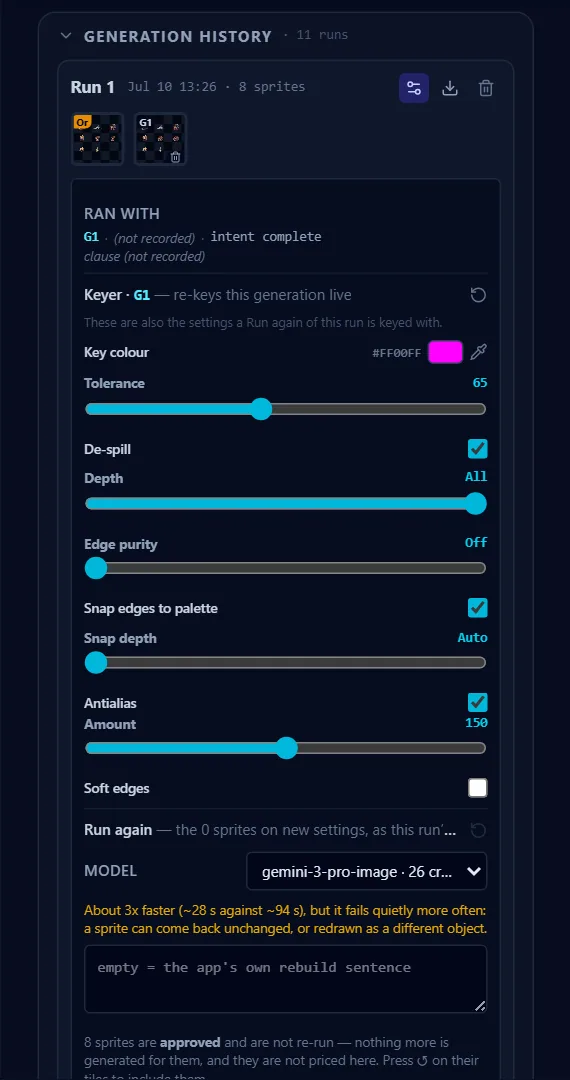
At the foot of the rail sits a disclosure: GENERATION HISTORY · {N} runs, collapsed by default. It is the record of every finished run — nothing in it is needed to finish the step. Before the first run it reads No runs yet — the Generate button above makes the first one. Every finished run lands here with its generations, its keyer and the record of what it ran with.
Each run is one slim row: Run {N}, then when it ran and how many sprites, tagged retry of Run {K} when all of its members came from an earlier run. Clicking the row previews that run in the left column and changes nothing else. Under it is a strip: the packed original (Or) and every generation (G1, G2, …); clicking any cell puts it in the preview and changes nothing. Each generation cell carries a 🖼 that shows exactly what the AI returned before any keying or cutting, and a 🗑 that deletes just that generation. Two markers can sit on a cell: a rose ∅ for a generation that produced nothing usable, and an amber T{n} counting sprites that came back with different printed numbers or lettering — its tooltip names them, and opening the generation is where you compare.
Three buttons sit on the right of the row:
⚙opens that run's settings, and only one run's are open at a time. Inside: a read-only record of what each generation actually ran with, the run's keyer — which re-keys that whole generation live and for free, and never touches a sprite carrying its own (see The keyer) — andRun again.⬇downloads that run's latest generation image, preferring the picture the AI returned.🗑deletes the run and all of its generations. It asks first, and it removes those versions from every sprite.
Run again
The last block of the ⚙ drawer sends the same sprites out once more on a Model and a guidance sentence you pick right there; its own ↺ puts both back to what the run went out with. The drawer says where the result will land before you click: — same {n} sprites on new settings, as this run's G{n} when it fits one call, or {N} NEW runs when it does not, with an amber line suggesting a roomier model if you want to keep it on this row. Sprites you have approved are left out and are not priced, and the drawer says so before the click. The button reads Run again · {X} cr — plus · {N} calls when it has to split — priced through the very same packer and mask cut the click sends with, so it can never quote one call and charge for two, and it asks for the credits before it touches the queue. It is dead while another run is holding those sprites, and says which run. Afterwards a note says exactly where the re-run landed, or that it did not land at all.
Re-cut G{n} — free
When a generation came back on a flat neutral field instead of magenta, and its sprites were cut before Pixploder learned to handle that, the run still stores the image the AI returned — so it can simply be cut again from those same bytes, with today's code. The row says so — ⓘ G{n} was cut before the grey-field repair — it can be cut again from the model's own image, free. — and offers Re-cut G{n} beside it. The confirmation is explicit: no model call, no credits. It replaces that generation in place in every version row — no new version appears and older takes are untouched — and it deliberately keeps each version's box, so finished art cannot shift under a repair. The dialog also names which keyer settings the re-cut will use: the ones that generation was really cut at, or, on a run too old to have recorded them, whatever that run's ⚙ says today. Afterwards the row records what happened in the same quiet voice: ⓘ G{n} was re-cut from the model's own image on {date} — the grey-field repair is applied to it.
A quiet ⓘ line can also carry what the output check saw on a generation — a record, not a decision, since the run is applied either way, and its wording is on Step 5 · Finish Sprites.
Free versus paid, at a glance
| Free | Paid |
|---|---|
Opening 👁 Calls, ticking and unticking calls | ⚡ Generate / ⚡ Generate all — one price per call |
Dragging a sprite between calls, + drop here | Run again — priced per call it would make |
Split into {N} calls (the split itself) | |
Repack, Auto-reduce sheets | |
Entering, using and leaving Pick | |
Previewing a run, ⬇, 🗑, deleting a generation | |
| A run's keyer, and re-keying a generation live | |
Re-cut G{n} |
That is the whole list: no other control on this page moves credits, and the two paid ones both print their price and ask before they spend.
Note. A project saved before this redesign can carry hand-made calls — a pinned default, a one-piece "combine", per-sprite placement nudges — and the packer still honors every one of them. Nothing in Step 5 creates them any more; placement for a rebuilt sprite is the completion frame in the fill-zone editor, and the model and prompt for what you queue next live in the section's ⚙.